Pinterest Video Downloader – Download HD Videos, GIFs & Images Free

Pinterest is great for collecting ideas, but it won't let you keep a video on your phone. Pin Catch fixes that. Paste a pin link into the box above and you get a Pinterest video download in HD, with no watermark and no login. It's a free Pinterest video downloader online, and it handles GIFs and images too.

  • No signup
  • No watermark
  • HD quality
  • 100% free
  • No download history stored

How to Download Pinterest Videos (3 Easy Steps)

It takes about thirty seconds. Copy a link, paste it, save the file. Nothing to install and nothing to sign up for.

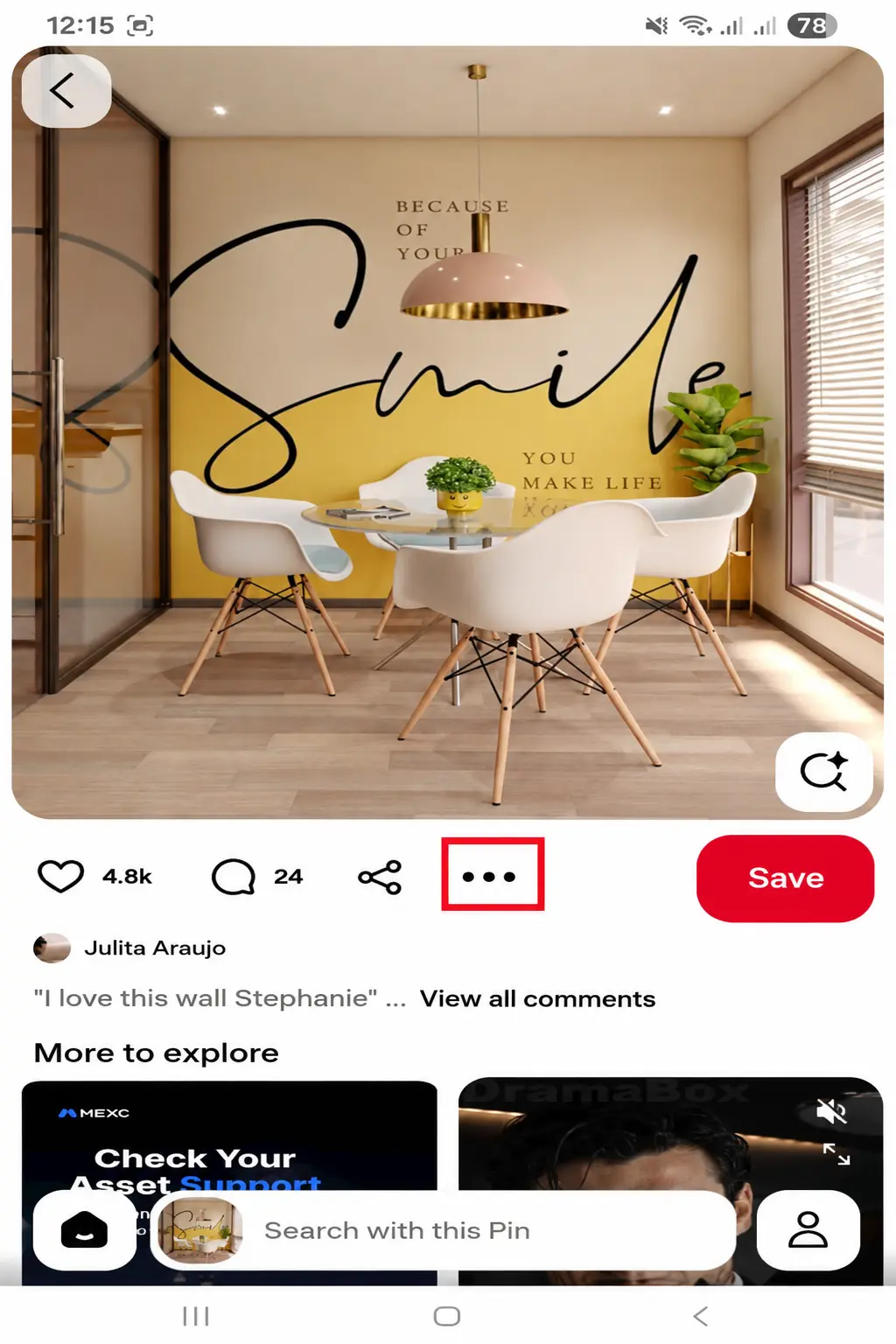
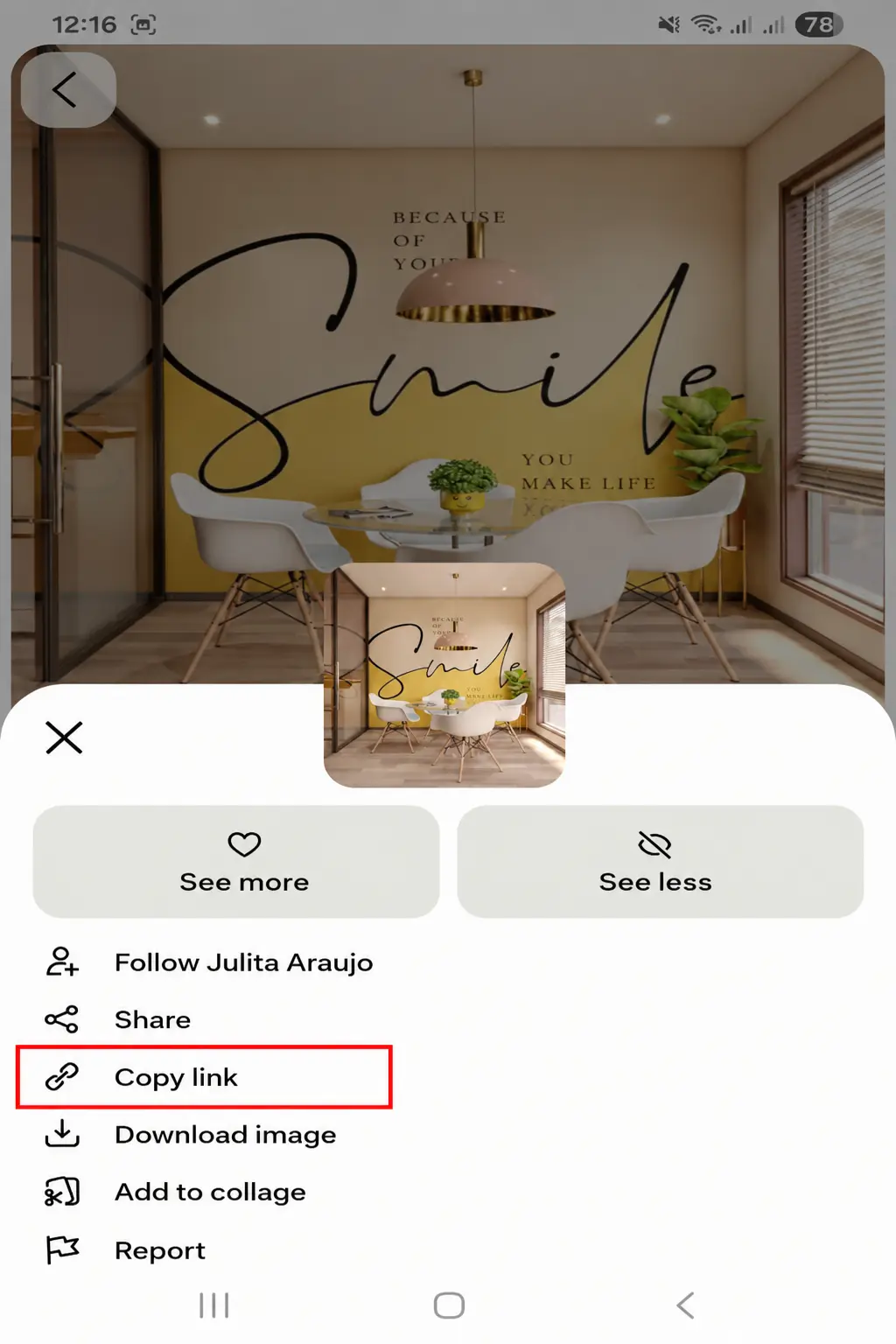
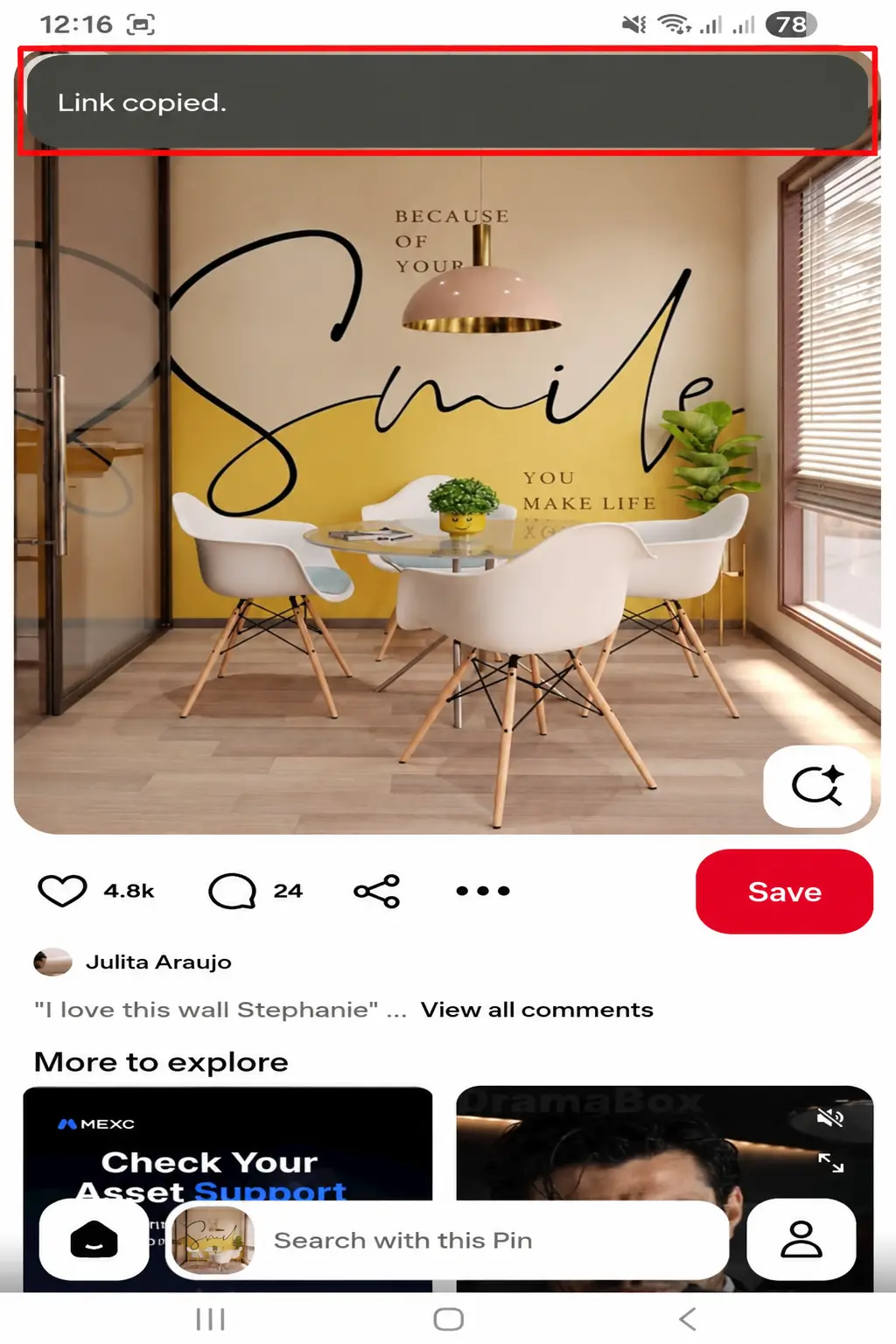
Step 1: Copy the Pinterest Video Link

Using your phone? Open the pin, tap the three-dot menu, and copy its link. On a computer, just copy the URL from your browser’s address bar. The long pinterest.com address and the short pin.it version both work as a Pinterest video download link.

Step 2: Paste the Link and Click Download

Come back to Pin Catch, tap the box at the top of this page, and paste. Hit Download. Pin Catch reads the public pin and looks for the video files Pinterest has for it. That takes a few seconds. A Pinterest link video download needs just that one link and nothing else.

Step 3: Choose Quality and Save the MP4

You'll see the qualities available for that pin. Pick one and tap Download again. The video saves to your device as an MP4. For a quick share, the standard option is fine. For editing or a bigger screen, go higher.

What Is Pin Catch Pinterest Video Downloader?

PinCatch is an online Pinterest downloader for saving available media from public Pinterest URLs. Instead of searching through Pinterest for a hidden download option, you provide the link to the Pin and let the downloader process it.The main tool is designed for Pinterest video download requests, but the site also provides separate tools for images, GIFs, profile pictures, URLs, and MP4 video files.

There’s no need to enter your Pinterest login details to use PinCatch. Just paste the link to a publicly available pin. You can download it without connecting your Pinterest account to the service.

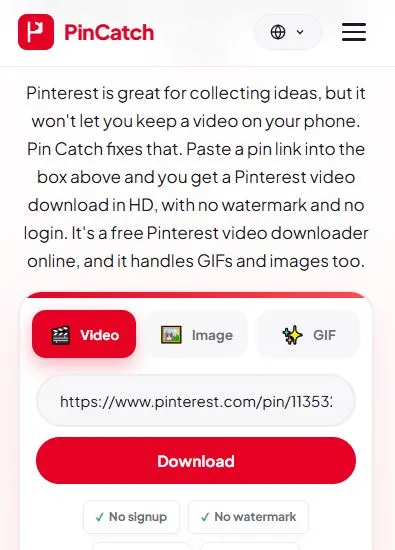
PinCatch Pinterest video downloader interface with link input and download button

Features of Our Pinterest Video Downloader

Download Without Watermark

Pin Catch doesn't stamp anything on your video. You get the file Pinterest serves for that pin, so this is a Pinterest video downloader without a watermark. Any logo added by the original creator will still appear in the downloaded video.

No Login or Registration Required

You can process a supported public Pinterest URL without entering your Pinterest username or password. There is no need to create a separate PinCatch account just to download a video.

No App or Installation Needed

Forget the Pinterest video downloader APK. PinCatch runs on any phone or computer browser. Paste the Pin URL, tap download, and you’re done

Preview Before You Download

After you paste a link, you can see what Pin Catch found before you save anything. It helps when you've got ten pins open and can't remember which one you wanted.

Fast, Free and Unlimited Downloads

PinCatch is available as a free online downloader. No subscription, no paid tier. For the best result, use the original Pin URL and a stable internet connection. Download speed can also depend on the size of the video and your connection.

Pinterest Video Download Quality and Formats

Video quality is one of the first things to check before saving a Pinterest video.

Pinterest's own Help Center Pin specs page explains what creators can upload: video Pins use H.264 or H.265 encoding and run from a minimum of 4 seconds up to 5 minutes. Because every creator uploads a different file, the quality you can save is always tied to the original upload.

Download Pinterest Videos in HD

Newer pins usually come in HD, typically 720p. When you see that option, go for it, because the difference on a phone or laptop screen is noticeable. Every quality the pin supports is listed, so there’s nothing to guess. Older pins sometimes top out at a lower resolution, and that’s normal.

Can You Download in 1080p or 4K?

Sometimes you can download a Pinterest video in 1080p, 2K, or even 4K, but only if the original upload was that sharp. PinCatch doesn’t upscale anything. A low-resolution pin stays low-resolution, no matter which tool you use. Be careful with any site that promises 4K on everything. Pinterest download HD works best when the original was uploaded in HD.

MP4 Downloads With Sound

Files come as MP4, which plays on phones, laptops, TVs and editing apps. That makes Pin Catch a quick way to convert Pinterest to MP4 without a separate converter. The original sound stays in the file. If a clip is silent, it was silent on Pinterest too.

Available Quality and Formats

OptionWhat to expect
Standard (SD)Smaller file, good on slow connections
HD 720pThe most common choice
Full HD 1080pOnly when the pin has it
4KVery few pins

What Pinterest Content Can You Download?

Pin Catch works with public pins, and videos are only one part of it.

Video Pins

Regular video pins are what most people come for. Paste the link and save the MP4. This is the standard pin video download.

Idea Pins

Idea Pins that contain video can be saved too, as long as they're public and the file is available.

Reels

Short Pinterest reels work like any other video pin. Our Pinterest reel downloader page has more on those.

GIFs

Animated pins save as GIF files. If that's all you need, the Pinterest GIF downloader page is the shortcut.

Images

Need a Pinterest photo download? Paste an image pin and save the picture at the largest size Pinterest offers. The Pinterest image downloader page covers it.

Carousel Pins

Carousels hold several images or videos in one pin. Where the files are available, you can save each item.

Download Pinterest Videos on Any Device

The steps are the same everywhere. What changes is where the file ends up.

Android

Copy the link in Pinterest, open Pin Catch in Chrome, paste, and download.

The MP4 goes into your Downloads folder, and most phones show it in the Gallery after a moment.

iPhone and iPad

Use Safari. Paste the link, tap Download, then tap the small download arrow near the address bar to open the file. Choose Share, then Save Video, to put it in Photos. Otherwise it waits in the Files app under Downloads.

iOS Workaround: Save Using a File Manager App

Sometimes Safari plays the video instead of saving it. If that happens, grab a free file manager like Documents by Readdle. Open its built-in browser, head to PinCatch, paste the link, and download. The video saves inside the app, and from there you can move it to Photos or Files.

Windows PC

Copy the Pinterest video link and paste it into PinCatch to start the download. Once it's finished, press Ctrl + J in Chrome or Edge to see your downloaded file.

Mac

Same steps. The file goes to Downloads, which you can open from the Dock. In Safari, click the arrow in the toolbar to see it.

Online Tool vs Browser Extension vs App: Which Is Best?

There are three ways to do this: an online Pinterest video downloader like Pin Catch, a browser extension, or a phone app.

Online toolBrowser extensionApp
Install neededNoYesYes
Works on phoneYesUsually notYes
PermissionsNoneOften broadOften several

Need a Pinterest video saved fast? Use an online downloader. There’s no app or extension to set up. You open the site, paste the Pin URL, and download the file.

A browser extension can be useful for people who download Pinterest content often. However, extensions require installation and may request browser permissions.

An app can offer a dedicated interface, but it also takes up storage and may require additional permissions or updates.

For the occasional download, skip the extra installs. PinCatch works right in your browser, and that’s usually the easiest way to do it.

Why Is My Pinterest Video Not Downloading?

Download problems can happen for several reasons, and your device isn't always to blame. Before trying anything complicated, check the Pinterest link first, then work through these fixes one by one.

The Pinterest URL Is Invalid or Incomplete

A cut-off or mistyped link is the top cause. Copy it again from the Share menu and paste it fresh. Make sure it points to one pin, not a board.

The Pin Is Removed, Private or Restricted

Pin Catch only works with public pins. If the creator deleted the pin or restricted it, no downloader could reach it.

The Video Type Is Not Supported

Some pins, like certain ads or embeds, don't carry a video file anyone can save. If the pin is really a link to another website, there may be nothing to download.

Browser or Network Problems

A weak signal, an old browser or an ad blocker can get in the way. Refresh the page, switch off the blocker for this site, move from mobile data to Wi-Fi, or try another browser.

Video Saves Without Sound or in Low Quality

This usually comes from the original. Some uploads are silent or small. Pick a higher quality if one is listed. Pin Catch can't add sound or sharpness that isn't in the source.

What to Do When a Download Fails

Watch the Pinterest video download status on the progress bar. If it sits at the same percentage for over a minute, refresh and paste the link again. Still stuck? Try a different pin. If other pins work, the problem is that one video

Is Pin Catch Safe to Use?

Pin Catch never asks for your Pinterest password or any login details. It works from the public link you paste, and nothing gets installed on your device. A few habits help on any download site:

  • Check you're on the real Pin Catch address before pasting anything.
  • Don't install apps or extensions that claim to be Pin Catch.
  • Keep your browser up to date.

Frequently Asked Questions

Is the Pinterest video downloader free?

Yes. Pin Catch costs nothing and there's no sign-up. It's a free Pinterest video download online with no hidden steps.

Can I download in 4K or 1080p?

Yes, when the original pin has it. Many offer 1080p, and 4K is uncommon. Pin Catch shows what's there and doesn't upscale.

How do I convert a Pinterest video to MP4?

You don't need a separate converter. Paste the link, choose a quality and download. The file arrives as an MP4.

Where are downloaded videos saved?

Usually in your Downloads folder. On iPhone, check the Files app, or use Share, then Save Video, to put it in Photos.

Can I download private Pinterest videos or boards?

No. Pin Catch only works with public pins. Private, deleted and restricted content can't be reached.

Can I download Pinterest videos on iPhone?

Yes. Safari usually works. If it doesn't, use a file manager app. The iPhone steps above cover both.

Can I download Pinterest videos without a watermark?

Yes. Pin Catch adds none. A logo built into the original video by its creator stays, because it's part of the clip.

What Pinterest link formats are supported?

Standard pinterest.com/pin links, pin.it short links, and share links. Use the link for a single public pin.

Conclusion

You don’t need an app or a login. Copy the Pin link, paste it into the box above, and PinCatch gives you an MP4. It runs in the browser on Android, iPhone, Windows, and Mac. Keep in mind that quality comes from the original pin: if Pinterest only has a small version, that’s what you’ll get, and 1080p or 4K appears only when it exists.

Try the Downloader